











How to get started with our Netsuite to Azure Synapse Analytics integration

1

Enter your Netsuite credentials to create a connection.

Connection docs
2

Select a predefined report or specific data to extract from.

Walkthrough
3

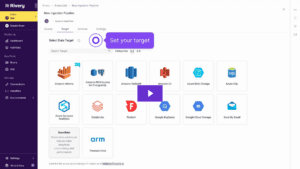
Select Azure Synapse Analytics as your target and start loading your data.

Connection docs

See it in action


Put your Netsuite data to use.
Deliver Netsuite data at the right time, to the right people.

icon

Transform your data

Turn raw data into business data models with SQL or Python.

icon

Activate your data

Sync data directly into your tech stack with reverse ETL.

Everything you need to simplify advanced data integration

icon

Zero Infrastructure to Manage

icon

Managed SQL/Python Modeling

icon

Predictable Value-Based Pricing

icon

Reduced Data Development Waste

icon

No-Code Any Data Ingestion

icon

Efficient Database Replication

icon

Infinite Scale

icon

Integrated Data Activation

icon

Proactive Troubleshooting

icon

Greg Robinson

Staff Data Scientist

icon
"Before, we'd have to do an API integration with a bunch of data engineers to get a single data source into a data warehouse. It took a really long time, was very, very expensive and it was prone to human error. Now, we've dramatically cut all that down with Rivery."

FAQ

Why extract data from NetSuite?

Using Rivery, you can pull data from NetSuite and send that data into your target database, data warehouse or data lake.

Here are a few reasons why as to you might want to pull data from NetSuite:


  • Better Reporting and Analytics: NetSuite’s built-in reports are fine, but they aren’t customizable to your specific use case. By pulling your data out and using a BI tool of your choice you can create custom dashboards to give stakeholders deeper insights.

  • Seamless Integration: If your company uses multiple systems—like a CRM, marketing platforms, or other tools—getting data out of NetSuite lets you sync everything up. This means you can see the full picture without jumping between platforms.
  • Centralized Data: Want to store all your data in one place, like Snowflake? Extracting data from NetSuite makes it easier to combine with other sources, supporting everything from basic reporting to complex machine learning projects.
  • Compliance and Auditing: Some industries have strict rules about data storage and reporting. By extracting data, you can meet these requirements more easily, ensuring you’re always compliant.
Why use Rivery?

Rivery’s integration with NetSuite allows users to create scalable, code-free data pipelines without needing a data engineer. Here are a few reasons why Rivery stands out:


  • Rivery’s No-Code Interface: Authentication in a financial platform like NetSuite can be a headache. Even when you get the API secret and token, you still have to set up the right permissions for users, which is no small task. Rivery makes this process easier with a no-code interface built specifically for NetSuite integration.

  • Rivery’s Real-Time Data Integration: With support for real-time data integration you can seamlessly sync data between NetSuite and your other data lakes or warehouses almost instantly, ensuring you always have the most up-to-date information.
  • Extract missing data using NetSuite Saved Searches with Rivery: Depending on the version or license you’re using, and the data you need, you might have to navigate different versions of NetSuite APIs. For example, NetSuite introduced a new version called SuiteAnalytics (or NetSuite2.com), replacing the older NetSuite.com API. SuiteAnalytics is great for pulling incremental data, but it still misses some data points. In these cases, Rivery’s integration with NetSuite allows you to extract the missing data using NetSuite Saved Searches.
  • Rivery’s Reverse ETL capabilities: With these capabilities, you can pull data from various sources like HubSpot and Salesforce and push it back into NetSuite. This is incredibly useful for business users, as it automates manual tasks and ensures that the data they need is readily available within their operational system, without having to jump between different platforms or dig into a data warehouse. For instance, you can use Rivery to sync opportunities created in HubSpot with NetSuite or to align data like opportunity deal sizes across both systems. Normally, this would involve writing complex functions for two separate APIs, Rivery simplifies the process by handling the logic and data flow, making it a breeze to push data back into NetSuite.
What are the differences between Netsuite.com vs Netsuite2.com?

Netsuite is the legacy SuiteAnalytics Connect views (i.e. essentially saved search)

NetSuite2 is the new SuiteAnalytics Workbooks facility.

Here are a few points you should be aware of when  migrating from NetSuite 1 to NetSuite 2.

  • The names of the tables and columns have changed.
  • You need to create a new type of connection
  • Not all tables have a ‘last-modified’ column yet (though Oracle and NetSuite add this column with each new release).
  • Permissions are now more restrictive; some tables require direct access to be visible in the list.

Rivery manages the NetSuite integration for you, so you don’t need to worry about API upgrades breaking your data pipelines. Rivery will continually maintain the integration with the latest API versions. Most upgrades would be seamless requiring no action on your end. If any API version change require your attention — like added, removed, or modified reports/data fields that you may be using — Rivery will notify you ahead of time with the details and any possible actions required.

How can I use Rivery’s data connectors?

Using Rivery’s data connectors is very straightforward. Just enter your credentials, define the target you want to load the data into (i.e. Snowflake, BigQuery, Databricks or any data lake and auto map the schema to generate on the target end. You can control the data you need to extract from the source and how often to sync your data. To learn more follow the specific docs.

Do data connectors comply with GDPR?

Yes. All data connectors within Rivery comply with the highest security and privacy standards, including: GDPR, HIPPA, SOC2 and ISO 27001. In addition, when the data flows into your target data warehouse, you can configure it to do so via your own cloud files system vs. Rivery.

What are the most popular data connectors?

The most popular data connectors are for use cases like marketing, sales and finance. These include Salesforce, HubSpot, Google Analytics, Google Ads, LinkedIn Ads, Facebook Ads, TikTok and more.

How does Rivery extract data from database integrations?

Rivery supports both CDC database replication and Standard SQL extraction so you can choose the method that works best for you. Learn more here.

Power up your data integration

icon icon